

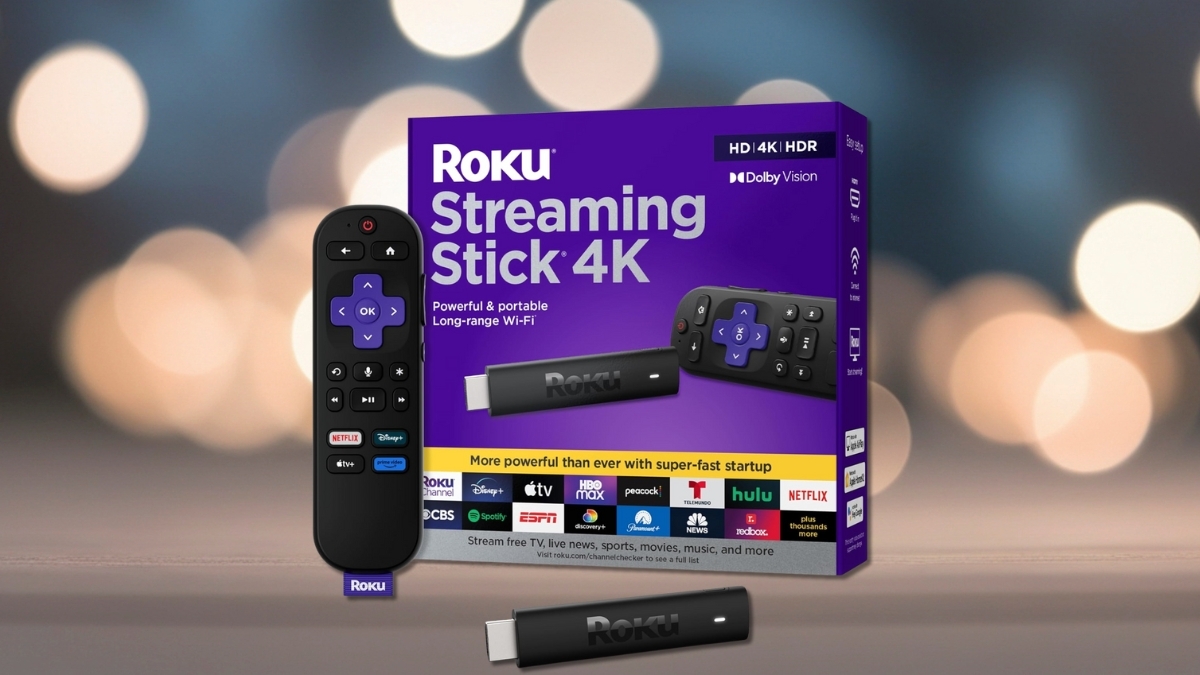
Tiny gadgets often come with low expectations. This one flips that idea fast. The Roku Streaming Stick 4K slides into a TV’s HDMI port and delivers sharp 4K streaming without taking up space or draining a wallet. It feels built for everyday use. Setup takes minutes. The interface stays simple. Streaming stays smooth.
The market is crowded with streaming devices. Many add features that feel unnecessary. This one keeps the focus on speed, picture quality, and easy access to popular apps.
Dolby Vision support stands out at this price. The long-range Wi-Fi makes a difference in larger homes. Frequent sales push the price well below $50, which makes it even more appealing.
This Roku fits bedrooms, living rooms, and travel bags with ease. It works well for cable-cutters and casual streamers alike.
Roku Streaming Stick 4K Review: Design and First Impressions
The Roku Streaming Stick 4K is small. It measures about 3.7 inches long and plugs directly into a TV’s HDMI port. No box. No clutter. This design works well for wall-mounted TVs or tight spaces.
Power comes from a TV USB port or the included wall adapter. Using the adapter delivers steadier performance during long streaming sessions. The stick supports HDMI 2.0 and handles 4K content at 60 frames per second without issue.
Heat control stays solid. Even after hours of use, performance remains stable. No slowdowns. No random restarts.
Picture Quality and Audio Performance
Picture quality stands out right away. The Roku Streaming Stick 4K supports 4K Ultra HD with HDR10, HDR10+, HLG, and Dolby Vision. Dolby Vision adds scene-by-scene adjustments that improve contrast and color. Dark scenes look clearer. Bright scenes stay balanced.
Streaming services like Netflix, Disney+, and Apple TV+ take full advantage of this support. Sports and fast motion content stay smooth with minimal blur.
Audio passes through HDMI with Dolby support. Dolby Atmos works when paired with compatible TVs and sound systems. Performance depends on connected hardware, yet supported content sounds clean and well-balanced.
Remote Control and Voice Features
The included voice remote feels practical. It controls TV power, volume, and mute. That reduces the need for extra remotes. Setup automatically syncs with most TV brands.
Voice search speeds things up. Saying a movie title or app name brings results fast. Playback controls respond well. The feature works best for search and navigation rather than full smart assistant tasks.
The Roku mobile app adds useful extras. Private listening sends audio to headphones through a phone. The app also works as a backup remote and includes a full keyboard for quick searches.
Apps, Streaming Services, and Interface
The Roku platform supports nearly every major streaming app. Netflix, Prime Video, Hulu, Disney+, Max, YouTube, Peacock, and Apple TV+ all run smoothly. App loading times stay quick.
The home screen uses a grid layout. Apps can be rearranged in seconds. Navigation feels responsive with little lag.
Universal search scans multiple platforms at once. That saves time and reduces app hopping. The Roku Channel adds free, ad-supported movies, shows, live TV, and news. It helps stretch entertainment options without extra subscriptions.
Setup and Everyday Use
Setup is straightforward. Plug in the stick. Connect to Wi-Fi. Sign into a Roku account. The on-screen guide walks through each step clearly.
Long-range dual-band Wi-Fi improves streaming stability. This helps in homes with routers placed far from the TV. Buffering stays rare during testing.
Parental controls limit content by rating. Multiple payment methods can be added to one account. Profiles stay basic, yet functional for shared households.
Smart Home and Device Compatibility
The Roku Streaming Stick 4K works with Alexa and Google Assistant. Voice commands can open apps, start playback, and turn the device on or off through supported smart speakers.
Apple users gain AirPlay 2 and HomeKit support. Videos, photos, and screens mirror easily from iPhones, iPads, and Macs. This feature adds flexibility without extra hardware.
Smart home control remains simple. The device focuses on streaming rather than acting as a central hub.
Price and Overall Value
Pricing remains one of the strongest points. The Roku Streaming Stick 4K often sells for $29.99 at major retailers like Walmart and Best Buy. The official price from Roku lists at $49.99, though discounts appear often.
No monthly fees are required. Software updates arrive regularly and extend the device’s lifespan. The only extra accessory some setups may need is an HDMI extender for tight port spacing.
Pros and Cons
Pros
- Excellent 4K picture quality with Dolby Vision
- Long-range Wi-Fi improves stability
- Compact design fits anywhere
- Voice remote controls the TV
- Broad app support
Cons
- No Ethernet port
- Dolby Atmos depends on external hardware
- No advanced gaming features
Final Thoughts on the Roku Streaming Stick 4K
The Roku Streaming Stick 4K delivers strong performance in a small package. It handles daily streaming with ease. Picture quality stays sharp. Navigation feels simple. The price makes sense, especially during sales.
This device works well for upgrades, secondary TVs, and travel use. It keeps things focused on streaming without adding clutter. Exploring it on Amazon opens up more details, reviews, and current pricing. There are plenty of other streaming options to explore too, yet this one earns attention for doing the basics very well.




