

When it comes to computer accessories, it’s rare to find a device that blends personality with practicality.
The Logitech POP Mouse is one of those rare finds. I picked it up after being drawn to its playful colors, but what surprised me was how much more it offers—quiet operation, eco-conscious design, and multi-device connectivity.
In this review, I’ll walk you through the features, design choices, performance, and real-world usability so you can decide if this vibrant wireless mouse deserves a place in your setup.
Distinctive Design That Makes a Statement
Before diving into features, let’s talk design—because the POP Mouse doesn’t try to blend in.
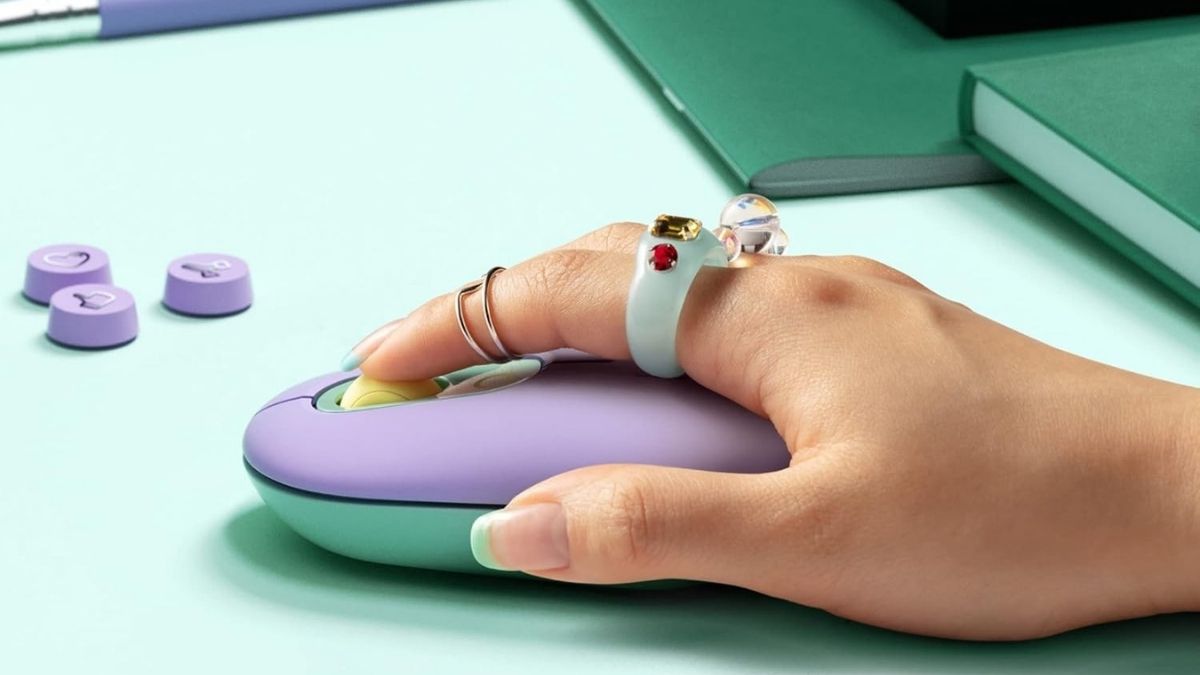
The pebble-shaped build feels natural whether you’re left- or right-handed, making it an ambidextrous choice without compromising comfort. Its color options are what truly set it apart: the mint, lilac, and yellow mix of the “Daydream” model instantly brightens up any desk. Other shades like “Blast,” “Heartbreaker,” “Mist,” “Cosmos,” and “Graphite” give you plenty of ways to match your personal style.
Weighing around 82 grams (with battery), it’s compact enough for travel but solid enough not to feel flimsy. If you’ve been craving a mouse that looks as good as it feels, the POP Mouse ticks both boxes.
Quiet Performance and Smart Features
Design is one thing—but can it actually perform? The POP Mouse makes its case with features that cater to everyday convenience.
Logitech’s SilentTouch technology cuts click noise by up to 90%, a lifesaver in shared spaces like offices, classrooms, or libraries. The SmartWheel scroll is equally impressive, automatically switching between precise step-by-step scrolling and fast, smooth scrolling when you need speed.
One quirky addition is the dedicated emoji button. With the Logi Options+ software, you can set it to instantly drop your favorite emoji—or repurpose it for shortcuts like app launching. This little touch makes the mouse feel more fun and customizable.
Connectivity and Compatibility
A good wireless mouse needs to keep up with modern workflows, and the POP Mouse doesn’t disappoint.
Using Bluetooth 5.1, it can pair with up to three devices at once. The Easy-Switch button lets you flip between them in a second, which is especially useful if you juggle a laptop, tablet, and desktop. It also supports Logitech Flow, meaning you can move your cursor and even transfer files seamlessly across devices.
The one caveat: it doesn’t come with a USB receiver, so if you want that, you’ll need to buy a Logi Bolt receiver separately. There’s also no wired mode, which might matter if you dislike batteries.
Battery Life and Power Management
Battery life is where this mouse really shines.
With just one AA battery (included), the POP Mouse can run for up to 24 months. Add in auto-sleep mode and smart power management, and you’ll likely forget when you last swapped the battery. While it doesn’t support USB-C recharging, the long lifespan more than makes up for it—and replacing a single AA is quick and easy.
Eco-Conscious Construction
Style and performance aside, the POP Mouse also reflects Logitech’s growing sustainability efforts.
The “Daydream” model uses 29% post-consumer recycled plastic, while other colorways vary slightly in recycled content. Even the packaging is eco-friendly, made from FSC-certified materials. Combined with its durable construction, the POP Mouse feels like a product designed not just for the moment, but for long-term use with less environmental impact.
Software Integration and Customization
What really unlocks the mouse’s potential is the Logi Options+ software.
Through it, you can remap buttons, set up shortcuts, and fully customize the emoji button to fit your workflow. The software also makes it easy to update firmware and manage multiple Logitech devices in one place. Pair it with Logitech Flow, and you’ll enjoy effortless multi-device navigation—something that power users will appreciate.
Real-World Performance Assessment
So how does it feel to actually use the POP Mouse day-to-day?
For general productivity—browsing, editing documents, or casual use—it’s excellent. The quiet clicks and compact design make it ideal for students in libraries, freelancers in coffee shops, or anyone working late without wanting to disturb others.
That said, it’s not built for everyone. If you have large hands, extended use might feel less ergonomic. And if you rely on side buttons for navigation or advanced features, you’ll find them missing here. It’s not meant for gaming or precision creative work either.
Price-to-Performance Ratio
The POP Mouse sits at a slightly higher price point than basic wireless mice, but that’s because it sells more than just functionality. It’s about personality, convenience, and eco-friendly design. If you’re buying purely for specs, you might find other mice with more buttons or advanced sensors at the same price. But if you value aesthetics, quiet performance, and sustainability, the POP Mouse makes a compelling case.
A Wireless Companion That Brings Joy
At the end of the day, the Logitech POP Mouse isn’t trying to be a pro gamer’s tool or a hardcore productivity device. It’s here to make daily computing quieter, more stylish, and more enjoyable—and it does exactly that. The bold colors, silent operation, and eco-friendly design all work together to create a peripheral that feels less like a tool and more like a desk companion.If you want a mouse that adds character to your setup without sacrificing performance, the POP Mouse is worth considering. It’s available now on Amazon, where you can also explore other Logitech mice if you’re curious about different styles or features.




