

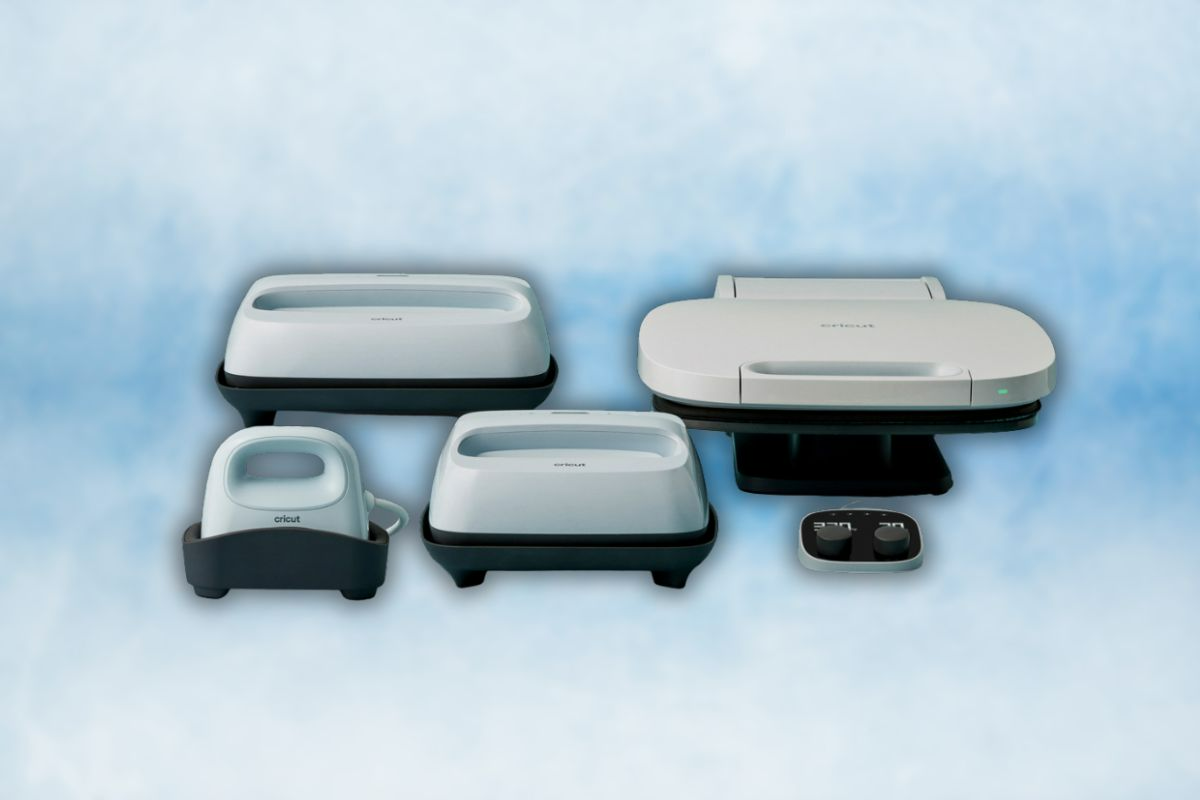
Looking to take your crafting projects to the next level in 2025? Cricut heat presses are designed to give makers and small business owners professional-quality results without the steep price of industrial equipment. Whether you’re personalizing t-shirts, hats, or home décor, Cricut’s lineup—from the compact Mini to the powerful Autopress™—offers precision, safety, and efficiency that regular household irons simply can’t match. In this guide, we’ll explore the best Cricut heat presses of 2025, their standout features, and the top deals you can find right now at Cricut.com.
The Revolution of Heat Transfer Crafting
Heat transfer technology has fundamentally changed how crafters approach personalization. Once limited to screen printing shops and professional services, the ability to create durable, vibrant designs on fabrics and other materials has now become accessible to hobbyists and small business owners alike. Cricut has been at the forefront of this transformation, bringing professional-quality heat transfer capabilities into homes and small studios.
Traditional household irons simply can’t deliver the consistent results serious crafters need. They lack uniform heat distribution, precise temperature control, and even pressure—all critical factors for successful heat transfers. For small business owners producing custom merchandise, these limitations translate directly to inconsistent products and wasted materials.
Cricut’s comprehensive heat press lineup addresses these challenges with purpose-built solutions:
- The EasyPress series offers flat, even heat in various sizes
- The compact Mini tackles small details and curved surfaces
- The specialized Hat Press conforms perfectly to headwear
- The automated Autopress™ delivers hands-free operation for production environments
As demand for personalized items continues to surge—from custom apparel to home décor—Cricut’s heat presses have positioned themselves as essential tools for creators who value professional results without industrial equipment investments.
Cricut Heat Press Technology: What Sets Them Apart
Cricut’s engineering approach focuses on solving the most common heat transfer challenges. Their ceramic-coated heat plates maintain precise temperatures up to 400°F (205°C), eliminating the hot spots and fluctuations that plague household irons.
Newer models like the EasyPress 3 incorporate Bluetooth connectivity that pairs with the Cricut Heat app, allowing users to select exact materials and receive recommended settings automatically. This digital precision removes guesswork from the process, particularly valuable for materials with narrow temperature tolerance ranges.
Safety considerations remain paramount in the design. Every model features:
- Insulated bases that protect work surfaces
- Auto-off functionality that activates after periods of inactivity
- Heat-resistant exteriors that minimize burn risks
- Stable designs that prevent tipping
The pressure distribution technology integrated into each press ensures even contact across the entire surface—critical for adhesive activation in heat transfer vinyl and infusible ink applications. While household irons require constant movement and manual pressure, Cricut presses maintain consistent contact without user strain.
Heat-up efficiency varies across the lineup, with the compact Mini reaching temperature in approximately 60 seconds, while the larger EasyPress 3 models require 1-2 minutes. The Autopress™, despite its substantial heating surface, achieves operating temperature within 3 minutes—considerably faster than comparable commercial equipment.
Finding Your Perfect Cricut Heat Press Match
The EasyPress Mini serves as an ideal entry point for crafters working with small designs or challenging surfaces. Its compact heating plate excels at intricate designs, sleeve details, and curved items like stuffed animals or baby clothes. The lightweight design makes it particularly suitable for crafters with limited strength or dexterity.
For most standard projects, the EasyPress 3 (9×9 in) hits the versatility sweet spot. This mid-size option handles everything from t-shirts to tote bags with comfortable margins for design placement. The square format accommodates most casual crafting needs without overwhelming a limited workspace.
Larger production needs find their match in the EasyPress 3 (12×10 in). The expanded surface area handles oversized garments, multiple smaller items simultaneously, and larger decorative pieces. Batch producers and those creating XL designs benefit most from this expanded format.
The specialized Hat Press addresses one of the most challenging customization surfaces with its curved design specifically engineered for headwear. The form-fitting shape eliminates wrinkles and ensures even application across the curved front of baseball caps and similar items.
For serious volume or professional operations, the Autopress™ represents Cricut’s flagship offering. Its automated operation frees users from having to apply pressure manually, while the substantial 15×12 in surface accommodates even the largest designs. The productivity gains make it particularly valuable for craft businesses where time equals profit.
When selecting between models, consider:
- Your typical project dimensions
- How frequently you use the press
- Available workspace for both operation and storage
- Initial budget versus long-term productivity needs
Exclusive Deals and Savings at Cricut.com
The current pricing landscape at Cricut.com presents exceptional value, particularly on higher-end models. The Autopress™, normally priced at $999, currently sells for $299—a 70% reduction that dramatically changes its accessibility for small businesses and serious hobbyists.
Other standout offers include:
- EasyPress 3 (12×10 in) at $149.99 (from $249.99)
- EasyPress 3 (9×9 in) at $119.99 (from $199.99)
- EasyPress Mini in Raspberry at $49.99 (from $69.99)
Direct purchases from Cricut.com typically outperform third-party retailers on overall value. While occasional sales at craft stores might match base pricing, Cricut’s bundle options incorporate materials and accessories that enhance the initial investment. Their Everything Kits include essential supplies like heat transfer vinyl, infusible ink, and application tools—allowing immediate project starts without additional purchases.
Seasonal promotions follow predictable patterns, with major price drops occurring during:
- Summer crafting season (May-June)
- Back-to-school period (August)
- Pre-holiday making season (October-November)
- Post-holiday clearance (January)
Subscribers to Cricut’s email list receive advance notice of flash sales and limited-time offers, often with 24-48 hour early access before public announcements.
Warranty coverage on direct purchases includes a one-year manufacturer’s guarantee, with optional protection plans extending coverage to three years. These plans specifically cover heating element failures and electronic malfunctions—the most common failure points in heat press equipment.
Expert Tips for Flawless Heat Transfer Results
Successful heat transfers begin with precise material settings. The Cricut Heat Guide (accessible via the Heat app or Cricut’s website) provides exact temperature and duration recommendations for over 25 material types. Following these guidelines eliminates guesswork and prevents common issues like scorching or incomplete adhesion.
For different project surfaces:
- Cotton fabrics: Pre-press for 5 seconds to remove moisture
- Polyester/synthetic blends: Use lower temperatures (315-330°F) to prevent scorching
- Wood surfaces: Ensure a completely dry substrate and use firm pressure
- Canvas: Pre-press to remove texture that might prevent full contact
Common failure points in heat transfer projects include peeling edges and fading colors. These typically result from:
- Insufficient temperature (adhesive doesn’t fully activate)
- Inadequate pressure (incomplete contact with substrate)
- Lifting too early (interrupting the cooling/setting process)
- Incorrect carrier sheet removal timing (warm vs. cool peel materials)
Pre-treatment considerations vary by project type. For fabric applications, washing and drying the base material removes manufacturing chemicals and pre-shrinks the fabric. For wood and porous surfaces, light sanding followed by cleaning with isopropyl alcohol creates an optimal bonding surface.
Maintaining your heat press ensures consistent performance over time. Monthly checks should include:
- Wiping the ceramic plate with a non-abrasive cleaner when cool
- Inspecting the power cord for any damage
- Checking the hinge mechanism (Autopress™) for smooth operation
- Calibrating temperature accuracy using heat-sensitive test strips
Creative Projects to Tackle With Your Cricut Heat Press
Custom apparel possibilities extend far beyond basic t-shirts. Experienced crafters achieve excellent results with:
- Athletic performance wear using specialized HTV formulations
- Denim jackets with layered vinyl designs
- Children’s clothing with character-based elements
- Workwear and uniforms with business identities
- Swimwear using chlorine-resistant vinyl formulations
Home décor applications transform living spaces with personalized elements like:
- Customized throw pillows with seasonal designs
- Table runners and placemats with family names or messages
- Canvas wall art combining painting and heat transfer elements
- Fabric bins and organizers with decorative labeling
- Window treatments with subtle accent designs
For those exploring business opportunities, heat transfer technology enables profitable product lines such as:
- Custom team uniforms for local sports organizations
- Personalized wedding and event merchandise
- Corporate branded apparel and promotional items
- Print-on-demand services for online retailers
- Customized gifts for special occasions
Seasonal applications create targeted marketing opportunities throughout the year. High-demand periods include:
- Back-to-school gear (August-September)
- Halloween costumes and décor (September-October)
- Holiday gifts and ornaments (November-December)
- Wedding season personalization (May-September)
The integration of Cricut cutting machines with heat presses creates a complete production ecosystem. Designs created in Cricut Design Space move seamlessly from digital concept to cut material to finished applied product, streamlining the creative process.
Your Next Steps to Crafting Excellence
Don’t miss the opportunity to transform your crafting projects with professional-quality results. Whether you’re a hobbyist or building a small business, Cricut heat presses deliver precision, safety, and consistency that ordinary irons simply can’t match. Head to Cricut.com today to explore the full range of heat presses, take advantage of current deals before they expire, and join the community of creators who’ve elevated their projects with Cricut technology. Your perfect heat press—and your next level of creativity—is just a click away.




