

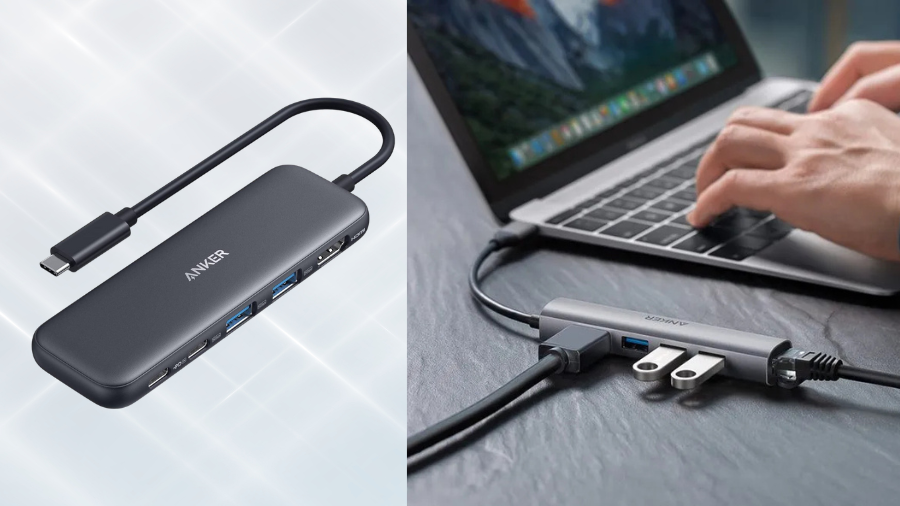
The frustration of limited ports on modern laptops is real—I recently found myself juggling between disconnecting my external drive and unplugging my mouse just to connect a presentation display. That’s precisely where the Anker 5-in-1 USB C Hub shines. At just 4.72 inches long and weighing a mere 2 ounces, this compact powerhouse turns a single USB-C port into a connectivity command center with HDMI output capable of stunning 4K resolution. But does this budget-friendly hub deliver performance that matches its promises? Let’s break down everything you need to know before making this your next tech essential.
Essential Port Expansion for Modern Devices
Five-Port Connectivity Solution
The Anker 5-in-1 USB-C hub transforms a single USB-C connection into a versatile connectivity station. With one HDMI port, one USB-C data port, two USB-A ports, and a dedicated USB-C power delivery port, this hub addresses most essential connection needs for modern laptops.
Each data port delivers 5Gbps transfer speeds, facilitating quick file transfers between devices. This performance makes the hub suitable for photographers transferring images, professionals sharing documents, or anyone managing moderate data loads.
Display Capabilities
The HDMI output supports 4K resolution at 30Hz (3840×2160), providing crisp visuals for presentations, streaming media, or extending your workspace. Users can choose between mirroring their laptop display or extending it for a dual-screen setup, enhancing productivity during intensive projects.
While the 30Hz refresh rate handles most productivity tasks and casual media consumption well, this limitation makes the hub less suitable for gaming or high-motion video content where smoother frame rates would be beneficial.
Power Delivery Features
One standout feature is the hub’s pass-through charging capability. When connected to a 100W power source, it delivers approximately 85W to your connected device while reserving about 10W for its own operation. This arrangement eliminates the need to choose between connectivity and charging—your laptop stays powered while you access all your peripherals.
It’s worth noting that the USB-C power delivery port functions exclusively for charging; it doesn’t support data transfer or video output. This specialization maximizes charging efficiency but requires understanding the port’s dedicated purpose.
Sleek Design Meets Practical Portability
Compact Form Factor
The hub’s dimensions—approximately 120 × 30 × 11.6 mm (4.72 × 1.18 × 0.46 inches)—create an impressively compact profile. This small footprint allows the hub to slip easily into laptop bags, pouches, or even pockets without adding bulk to your mobile setup.
Weighing only about 2 ounces (57-78g depending on region), the device adds negligible weight to your travel kit. This lightweight construction contributes significantly to its appeal for frequent travelers, remote workers, and anyone who values mobility.
Design and Construction
The hub features a streamlined plastic chassis that balances affordability with functionality. While premium hubs might offer aluminum construction, this plastic design contributes to both the lighter weight and more accessible price point.
True plug-and-play operation eliminates the need for external power adapters or complicated setup procedures. Simply connect to a compatible USB-C port, and all functions become immediately available, enhancing the convenience factor for users on the move.
The minimalist aesthetic complements modern laptops and workspaces without drawing attention to itself—a practical design choice for professional environments.
Compatibility and Performance Considerations
Device Compatibility
The hub works seamlessly with:
- macOS 12+ devices equipped with USB-C/Thunderbolt 3 or USB4 ports that support DisplayPort Alt Mode and Power Delivery
- Windows 10/11 PCs with DisplayPort Alt Mode capability
- ChromeOS systems that support DP Alt Mode
However, potential buyers should note several compatibility limitations. The hub doesn’t work with most Linux systems, the Apple SuperDrive, Nintendo Switch, or Pixel 7/9 devices. These restrictions highlight the importance of verifying compatibility before purchase.
Performance Limitations
While the hub delivers solid everyday performance, several limitations warrant consideration:
The HDMI output caps at 30Hz refresh rate, which proves adequate for static content but may disappoint users seeking smooth motion for gaming or video editing. For presentations, streaming services, and general productivity, this refresh rate remains sufficient.
The USB-C power delivery port handles charging exclusively—it cannot transfer data or video signals. This specialization maximizes charging efficiency but requires users to understand each port’s dedicated function.
The plastic construction, while contributing to the lighter weight and lower price point, may feel less premium and potentially less durable than metal alternatives.
Value Proposition: Budget-Friendly Connectivity
Affordable Pricing
At approximately $20-25, this hub delivers exceptional value compared to premium alternatives that often cost two to three times more. The accessible price point makes it an attractive option for budget-conscious users who need essential connectivity without advanced features.
The 18-month Anker warranty provides additional value, offering peace of mind regarding the hub’s durability and performance over time. Anker’s customer support further enhances this value proposition.
Practical Performance
For everyday productivity tasks, the hub delivers reliable data transfer performance across all ports. The 5Gbps speed handles most common file transfers efficiently, though it falls short of the higher speeds offered by more premium connectivity solutions.
The power delivery capability satisfies most laptop charging needs while using peripherals. With approximately 85W pass-through power, the hub accommodates the charging requirements of most ultrabooks and mainstream laptops, though some high-performance machines might charge more slowly than with their native chargers.
This hub represents an ideal entry-level solution for users who prioritize basic connectivity over premium features. The combination of essential ports, reliable performance, and affordable pricing creates a compelling package for students, casual professionals, or anyone establishing a basic workstation.
For frequent travelers, this hub serves perfectly as a secondary connectivity solution when you prefer not to risk more expensive accessories during travel. Its lightweight design and essential functionality make it a sensible addition to any mobile work kit.
The Verdict: Practical Connectivity Without Breaking the Bank
The Anker USB C Hub 5-in-1 delivers exactly what most users need—reliable connectivity in a compact, affordable package. While it won’t satisfy demanding gamers or video editors with its 30Hz refresh rate limitation, it excels as a practical solution for presentations, everyday productivity, and basic entertainment setups. The balance of portability, functionality, and value makes this hub particularly compelling for students, business travelers, and remote workers who need essential connectivity without the bulk or cost of premium alternatives. For under $25, you’re getting Anker’s renowned reliability in a hub that handles the basics exceptionally well.




