

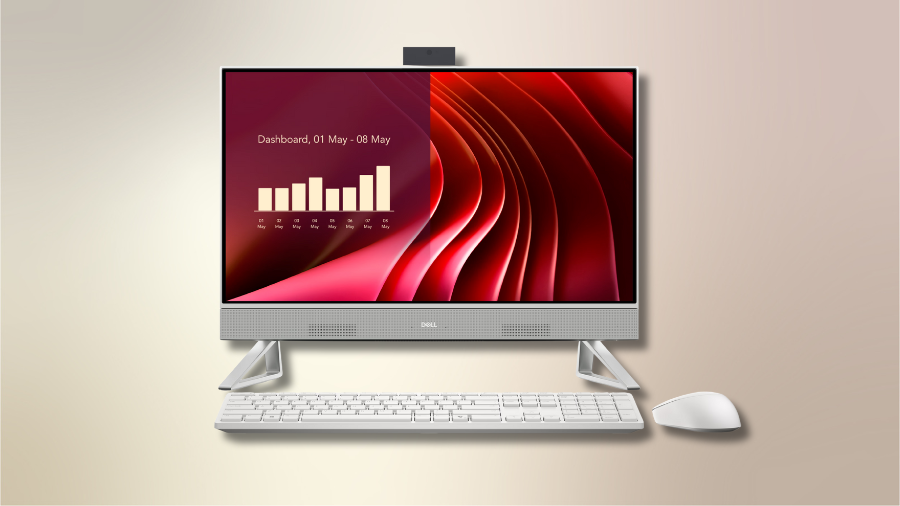
The Dell 24 All-in-One Desktop ec24250 represents a significant leap forward in the compact computing space. With its nearly borderless 23.8-inch display, this machine packs impressive performance into a minimalist footprint. According to performance metrics, the Core 5-120U configuration scores approximately 2050 in single-core and 6912 in multi-core Geekbench 6 tests—numbers that rival many traditional desktop setups. I’ve found this combination of power and elegance particularly compelling for modern work environments where space comes at a premium.
Meet the Dell 24 All-in-One: Sleek Design Meets Productivity
The Dell 24 All-in-One (AIO) positions itself as a versatile computing solution that balances form and function in a compact package. With its InfiniteEdge display design, this 23.8-inch system creates an impressive visual presence while occupying minimal desk space. The narrow borders surrounding the screen enhance the system’s modern aesthetic and provide a more immersive viewing experience.
The 23.8-inch form factor represents a thoughtful compromise between screen real estate and physical footprint. This size delivers sufficient space for productivity tasks like document editing and spreadsheet work, while remaining compact enough for smaller home offices and shared workspaces.
All-in-One systems continue gaining traction in both home and office environments. Their simplified setup, reduced cable clutter, and integrated components appeal to users seeking a streamlined computing experience without sacrificing performance.
Display Quality and Visual Experience
Panel Specifications and Performance
The Dell 24 AIO features a Full HD (1920×1080) IPS panel that delivers solid visual performance for everyday tasks. The IPS technology ensures consistent colors and wide viewing angles, making it suitable for both individual use and collaborative sessions where multiple people may view the screen simultaneously.
Touch vs. Non-Touch Options
The system comes in both touchscreen and non-touch variants to accommodate different user preferences. The touchscreen model adds intuitive navigation options and enhances the Windows 11 experience, particularly for creative applications. The non-touch variant maintains the visual quality while offering a more traditional computing experience at a potentially lower price point.
InfinityEdge Design Advantages
The narrow-border InfinityEdge design isn’t merely aesthetic—it creates a more immersive viewing experience by minimizing visual distractions around the content. This design approach maximizes the screen-to-body ratio, effectively making the 23.8-inch display feel more spacious than its dimensions would suggest.
Ergonomic Considerations
The display can be adjusted for optimal viewing angles, allowing users to find comfortable working positions. This adaptability proves particularly valuable for extended work sessions, helping reduce neck strain and improving overall ergonomics.
Performance Breakdown: Processors, Memory, and Storage Options
Processor Tier Comparison
The Dell 24 AIO offers three distinct processor options to match varying performance needs:
- The Intel Core 3-100U provides entry-level performance with 6 cores and 8 threads, reaching clock speeds up to 4.7 GHz. This configuration handles basic productivity tasks and web browsing efficiently.
- The Intel Core 5-120U steps up to 10 cores and 12 threads, with boost speeds approaching 5.0 GHz. This mid-tier option balances performance and value for more demanding workflows.
- The flagship Intel Core 7-150U maintains the 10-core architecture while enabling the optional NVIDIA discrete graphics upgrade, creating the most capable configuration in the lineup.
Benchmark data shows the Core 5-120U achieving approximately 2050 points in single-core and 6912 points in multi-core Geekbench 6 tests, indicating solid performance for mainstream computing needs.
Memory Configuration and Upgradability
The system ships with either 8GB or 16GB of DDR5-5200 MHz RAM, configurable as either a single 8GB module or dual-channel 2×8GB setup. Notably, the two SO-DIMM slots allow for future memory upgrades, extending the system’s useful lifespan and adaptability to changing requirements.
Storage Options and Expansion
Storage configurations include either a 512GB or 1TB M.2 PCIe NVMe SSD, delivering responsive system performance and app loading. The inclusion of an additional M.2 expansion slot provides valuable flexibility for storage upgrades without replacing the primary drive.
Graphics Capabilities: From Basic to Creative
Integrated Graphics Performance
The Intel UHD and Iris Xe integrated graphics options handle everyday computing tasks efficiently. These solutions support multiple displays, high-definition video playback, and basic content creation workloads while maintaining energy efficiency.
NVIDIA Discrete Graphics Option
Select configurations with the Core 7 processor can be equipped with an NVIDIA GeForce MX570A GPU featuring 2GB of GDDR6 memory. This discrete graphics option significantly enhances capabilities for photo editing, video production, and casual gaming experiences.
The MX570A represents a substantial performance upgrade over integrated graphics while maintaining reasonable power consumption for an All-in-One form factor. This configuration targets users with creative workloads or those seeking occasional gaming capabilities without investing in a dedicated gaming system.
Connectivity and Ports: Everything You Need
Comprehensive Port Selection
The Dell 24 AIO provides extensive connectivity options to support diverse peripherals and usage scenarios:
The rear panel houses three USB-A 3.2 Gen1 ports, one USB-A 3.2 Gen2 port with PowerShare functionality, HDMI-in 1.4, HDMI-out 1.4b, RJ-45 Ethernet, and a headset jack. This arrangement accommodates multiple peripherals while keeping cables organized behind the system.
A side-mounted USB-C 3.2 Gen2 port enables quick connections for temporary devices like external drives or smartphones, eliminating the need to reach behind the system for frequent connections.
Wireless Connectivity
The system features Intel AX211 Wi-Fi 6E connectivity, providing high-speed wireless networking with reduced latency and improved performance in congested environments. Bluetooth 5.x support enables wireless peripherals like keyboards, mice, and audio devices without consuming USB ports.
Media and Expansion Options
The integrated SD card reader simplifies media transfers from cameras and other devices. Combined with the internal M.2 expansion slot, these features create a surprisingly adaptable system despite its All-in-One design constraints.
The Verdict: Is the Dell 24 All-in-One ec24250 Right for You?
After examining all aspects of this system, it’s clear that the Dell 24 All-in-One ec24250 offers compelling value for those seeking a balance of performance, aesthetics, and space efficiency. Its scalable configurations ensure there’s a model suitable for most mainstream computing needs, though specialized users should consider their specific requirements carefully.




