

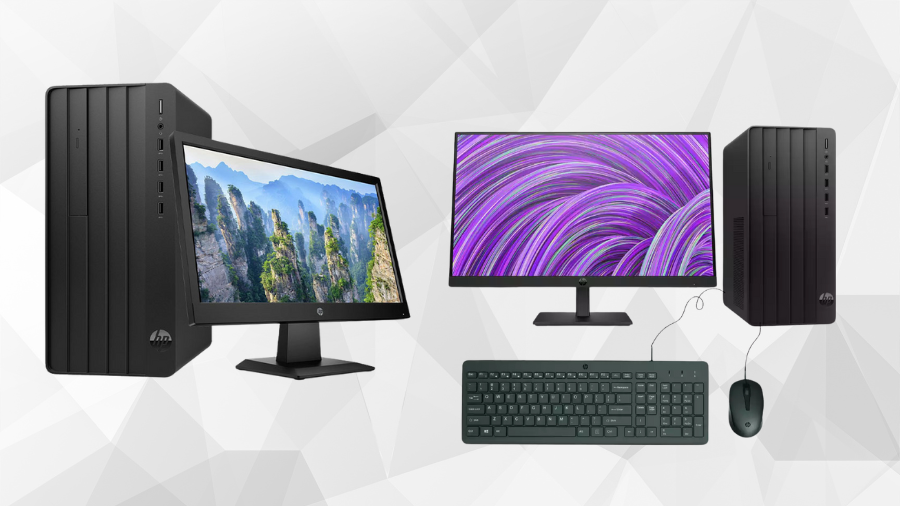
The Intel Core i3-13100 forms the foundation of the HP Pro Tower 290 G9, delivering robust performance for business computing needs. With 4 cores and 8 threads, this processor efficiently handles multitasking scenarios common in office environments. The base frequency of 3.4 GHz provides consistent performance for everyday tasks, while the turbo boost capability of up to 4.5 GHz offers additional processing power when needed for more demanding workloads.
The 12MB L3 cache significantly contributes to system responsiveness, particularly when switching between applications or accessing frequently used data. This cache size represents a substantial improvement over previous generation i3 processors, reducing latency and improving overall computing efficiency.
For graphical tasks, the integrated Intel UHD Graphics 730 supports dual-display setups and handles standard office applications competently. While not designed for intensive 3D modeling or high-end video editing, it performs admirably for document creation, spreadsheet manipulation, presentation development, and web conferencing—core tasks in business environments.
Memory and Storage: Foundation for Productivity
The standard 8GB DDR4-3200 MHz memory configuration provides sufficient RAM for most business applications and moderate multitasking. The architecture supports memory-intensive operations with reasonable performance, though users working with large datasets may benefit from utilizing the expansion capabilities. With two DIMM slots supporting up to 64GB of memory, the system offers considerable room for future growth as application demands increase.
Storage performance significantly impacts daily productivity, and the 256GB PCIe NVMe M.2 SSD delivers exceptional speed for system boot and application loading. Users can expect Windows to start in seconds rather than minutes, and programs to launch promptly, minimizing downtime throughout the workday.
For businesses with substantial storage requirements, the optional secondary storage support for up to 2TB 7200 rpm SATA HDD provides an excellent balance between performance and capacity. This configuration works particularly well for organizations that need to maintain large document archives, media libraries, or databases while keeping frequently accessed files on the faster SSD.
The optional HP 9.5mm Slim DVD-Writer addresses specialized needs for organizations working with legacy media or requiring physical data distribution methods. Though increasingly rare in modern computing environments, this option maintains compatibility with established workflows in certain industries.
Connectivity and Expansion: Ready for Business
The HP Pro Tower 290 G9 features comprehensive connectivity options, starting with eight USB ports strategically divided between the front and rear panels. The front-facing array includes four USB Type-A (5Gbps) ports for convenient access to frequently connected peripherals like flash drives and mobile devices. The rear panel provides four additional USB 2.0 Type-A ports for more permanent connections such as keyboards, mice, and printers.
Display connectivity supports flexible workspace configurations through both HDMI and VGA ports. This combination accommodates both modern and legacy monitors, enabling cost-effective dual-display setups that can significantly enhance productivity for data analysis, content creation, and multitasking scenarios.
Network connectivity remains robust with integrated 10/100/1000M Gigabit Ethernet for reliable wired connections, complemented by Realtek Wi-Fi 6 for high-speed wireless networking. The inclusion of Bluetooth 5.3 supports modern wireless peripherals with improved range, bandwidth, and connection stability compared to previous standards.
The expansion architecture includes one PCIe 4.0 x16 slot and one PCIe 3.0 x1 slot, providing pathways for future hardware additions such as specialized capture cards, advanced networking equipment, or graphics upgrades. Combined with the two M.2 slots (dedicated to WLAN and storage), these expansion options ensure the system can adapt to evolving business requirements.
Graphics Options: From Basic to Professional
While the integrated Intel UHD Graphics 730 handles standard business applications effectively, the HP Pro Tower 290 G9 offers several discrete graphics options for more specialized workloads.
The AMD Radeon RX 6400XT with 4GB GDDR6 memory represents an entry-level discrete solution, providing improved performance for light media editing, basic CAD work, and multi-display configurations. This option strikes a balance between enhanced capabilities and cost-effectiveness for users who occasionally need additional graphical processing power.
For moderate graphics requirements, the NVIDIA GeForce RTX 3050 with 8GB GDDR6 memory delivers substantial performance improvements. This configuration supports more demanding visualization tasks, moderate 3D modeling, video editing, and computational workloads that can benefit from CUDA acceleration.
Organizations with intensive graphics needs might consider the AMD Radeon RX 6600 XT with 8GB GDDR6 memory. This powerful mid-range option handles complex rendering tasks, advanced video editing, and more demanding 3D applications with impressive efficiency.
For specialized professional applications, particularly in fields like architecture, engineering, and scientific visualization, the NVIDIA Quadro T400 with 4GB GDDR6 memory offers certified drivers and optimized performance. Though less powerful in raw specifications than some gaming-oriented cards, the Quadro series provides reliability and precision for mission-critical professional applications.
Form Factor and Design: Compact Efficiency
The HP Pro Tower 290 G9 features thoughtful dimensional engineering at 15.5 x 30.3 x 33.7 cm, striking an optimal balance between internal component space and external footprint. This compact tower design efficiently utilizes office space without sacrificing accessibility or cooling performance.
Weighing approximately 4.7 kg (varying by configuration), the system remains manageable during installation or workspace reorganization. The internal layout prioritizes thermal efficiency with strategically positioned components and airflow channels that maintain appropriate operating temperatures even during sustained workloads.
During typical business operations, the acoustic profile remains unobtrusive, with cooling systems that respond dynamically to processing demands. This balanced approach prevents the system from becoming a distraction in quiet office environments while ensuring adequate cooling during intensive tasks.
Maintenance accessibility features prominently in the design, with tool-less entry for common service operations. This approach reduces downtime during memory upgrades, storage additions, or component replacements, maximizing the system’s operational availability.
The included HP 125 Wired Keyboard and Mouse provide reliable input devices with business-appropriate design. While not premium peripherals, they offer consistent performance suitable for everyday business use with standard key layouts and ergonomics.
Business Security: Protecting Your Investment
The HP Pro Tower 290 G9 incorporates multiple security layers beginning with the Trusted Platform Module (TPM) 2.0, which provides hardware-based security functions including secure key storage, attestation, and encryption support. This foundation enables advanced features like Windows BitLocker drive encryption and secure credential storage.
Physical security receives appropriate attention with multiple integrated options. The padlock loop supports traditional security approaches, while the cable lock slots accommodate modern security systems. These features prevent unauthorized hardware access and deter theft in open office environments.
The system supports secure boot protocols that verify firmware integrity before loading the operating system, preventing sophisticated boot-level attacks. This protection extends throughout the boot process, ensuring that malicious code cannot compromise the system during startup.
For organizations with regulatory compliance requirements, the security architecture supports implementation of controls necessary for standards including HIPAA, PCI DSS, and GDPR. The combination of hardware and software security features provides flexibility in addressing specific compliance needs while maintaining operational efficiency.
Remote management security considerations include encrypted communication channels and role-based access controls that maintain security even when systems are administered from off-site locations. These capabilities become increasingly important in hybrid work environments where IT staff may not have direct physical access to systems.




