

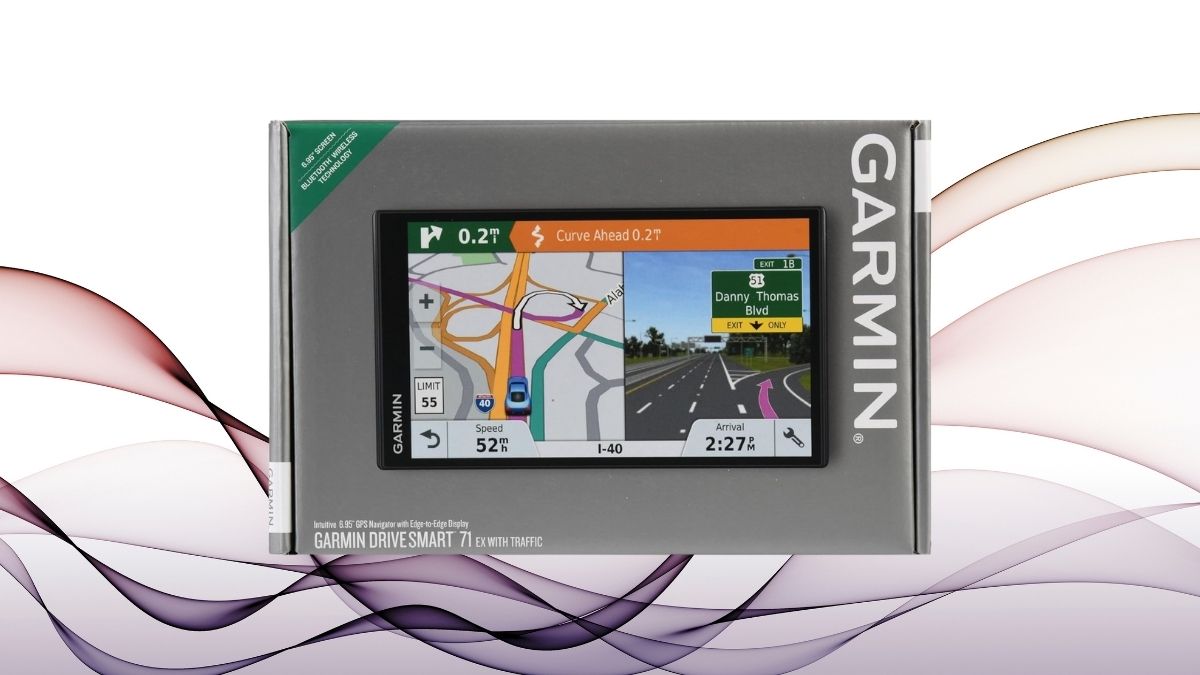
We’ve all been there—lost in an unfamiliar city, dealing with poor cell signal, or watching a navigation app crash right when you need it most. In moments like these, relying on your phone just doesn’t cut it. That’s where dedicated GPS systems like the Garmin DriveSmart 70 LMT come into play—offering peace of mind, reliability, and distraction-free guidance.
The open road demands a reliable navigator, and the Garmin DriveSmart 70 LMT aims to deliver just that. With a bright 7-inch display, advanced voice navigation, and a full suite of smart features, it stands out in a landscape dominated by smartphone apps.
Let’s take a deeper look into how this GPS device performs across various categories, from display quality and connectivity to real-world usability.
Design and Build Quality
Garmin has a reputation for building durable and user-friendly devices, and the DriveSmart 70 LMT upholds that legacy. Its sleek form factor and solid mounting system make it suitable for everyday drivers and road trip veterans alike.
Here’s a breakdown of the design highlights and how they translate into real-world practicality.
- Premium construction with practical dimensions
Though listed as the DriveSmart 71 EX on Amazon, this model closely resembles the 70 LMT. Measuring 6.5″ x 3.5″ x 0.25″, it’s slim and lightweight yet durable—perfect for dashboard use without adding bulk. - Included mount and buttons
The dashboard mount has a sturdy suction base and flexible joint. Physical control buttons offer an added layer of user-friendliness, especially useful on rough roads or for users who prefer tactile input.
Display Performance and Usability
A navigation device lives and dies by the quality of its screen. The DriveSmart 70 LMT offers a sizable display that enhances visibility and ease of use without overwhelming the driver.
In this section, we’ll examine how the screen performs in terms of resolution, responsiveness, and overall usability.
- Bright, high-resolution display
The 6.95-inch screen has a resolution of 480 x 272. While not ultra-HD, it’s plenty sharp for route navigation and viewing street names at a glance. - Touchscreen responsiveness and visibility
The capacitive touchscreen performs well in various conditions, including light rain. It supports pinch-to-zoom and remains visible in most lighting, though glare can occur under direct sunlight.
Navigation Features and Accuracy
Beyond just getting from A to B, modern GPS devices must offer intelligent routing, real-time updates, and accurate guidance. The DriveSmart 70 LMT delivers on these fronts with thoughtful features designed to reduce stress and keep you informed on the road.
Let’s explore its key navigational capabilities and how they contribute to a smoother driving experience.
- Lifetime map updates and traffic alerts
Free map updates across North America mean no extra subscription fees. The included traffic antenna offers live rerouting suggestions based on real-time congestion. - Voice navigation and lane guidance
Garmin Voice Assist supports hands-free input, while Real Directions and Active Lane Guidance make turns and exits easier using landmark-based cues and clear visuals. - Direct Access and Foursquare integration
This is especially helpful in large complexes. Instead of just an address, the GPS guides you to specific entrances and integrates up-to-date Foursquare business data like ratings and hours.
Connectivity and Smart Features
In an increasingly connected world, standalone GPS units need to offer features that rival smartphone apps. The DriveSmart 70 LMT doesn’t disappoint, boasting Bluetooth, Wi-Fi, and smart notification capabilities.
Here’s how it keeps you informed and connected without compromising safety.
- Bluetooth and Wi-Fi integration
Pairing is fast and reliable, enabling hands-free calls. Wi-Fi support also means you can update maps and software without using a computer. - Smart notifications
See texts, app alerts, and calls directly on your screen—no more checking your phone while driving. It also offers quick, predefined replies for texts.
Driver Alerts and Safety Features
Navigation is only part of the equation—driver safety is another crucial aspect. Garmin incorporates several real-time alerts and warnings designed to make your journeys safer and more informed.
These features work in the background to reduce surprises on the road and promote better driving habits.
- Advanced safety notifications
The GPS warns you about curves, speed limit changes, school zones, and more—helping you drive more cautiously, especially in unfamiliar territory. - Camera and enforcement warnings
Red-light and speed camera alerts help prevent surprises, though their availability depends on local coverage. You can also customize alerts for regional compliance.
Power and Battery Considerations
Although not a standalone device in terms of battery life, the DriveSmart 70 LMT performs admirably when connected to vehicle power. Efficient energy use and thoughtful cable design further add to its practicality.
Let’s look at how the unit manages its power and what you can expect during use.
- Power management
The startup is quick, and the system features sleep mode and brightness control. The bundled cable serves both charging and traffic functions, keeping setup clean.
- Battery life and usage
Expect 45–55 minutes of runtime on a full charge. For longer trips, you’ll want to keep it plugged in—ideal for users who travel frequently.
The Verdict: Is It Worth It?
At a price point of $259.95, the Garmin DriveSmart 70 LMT (or 71 EX) offers tremendous value for those seeking a dedicated navigation solution. It shines in areas where smartphones struggle, particularly in signal-dead zones and during extended travel.
If you’re a frequent traveler, rideshare driver, or someone who prefers the reliability of dedicated hardware, this unit is a compelling investment. For everyone else, it offers peace of mind that your directions won’t vanish with your mobile signal.




