

Have you ever caught yourself juggling too many devices just to get one thing done? A laptop for work, a tablet for sketching or reading, maybe even a second screen for meetings or video calls? It’s easy to feel like we’re drowning in tech—each device good at one thing, but never quite the whole package. Wouldn’t it be nice if just one sleek, powerful gadget could handle it all?
That’s the question a lot of us are asking these days. Whether you’re a student bouncing between classes and side projects, a remote worker trying to stay productive from anywhere, or a creative looking for a tool that keeps up with your ideas, having one go-to device sounds like a dream. And lately, more people are wondering: can an iPad really replace your laptop—or even be better?
That curiosity leads many to look at Apple’s iPad Pro lineup. But new can mean pricey. That’s where the 2022 iPad Pro (renewed) starts to look really interesting. It promises premium performance, stunning visuals, and pro-level tools—without the sticker shock. So is it worth it?
Let’s dive in and see how this refurbished powerhouse stacks up in real-world use.
M2 Chip Performance: Flagship Power in Refurbished Form
One of the biggest reasons to choose the 2022 iPad Pro is its brain—the powerful Apple M2 chip. This is the same processor used in some of Apple’s MacBooks, giving you desktop-level power in an ultra-portable form. Even in this renewed model, the performance feels fast, fluid, and reliable.
Key highlights:
- 8-core CPU and 10-core GPU – Delivers faster processing and smoother graphics performance, perfect for demanding creative workflows.
- Up to 15% faster CPU and 35% faster GPU than the M1 iPad Pro – Noticeable speed improvements in multitasking and rendering.
- 8GB RAM (for the 256GB model) – Handles professional apps and multitasking with ease.
A Display That Dazzles: Liquid Retina XDR
The screen is where you’ll spend most of your time, and this iPad Pro doesn’t disappoint. Its 12.9-inch Liquid Retina XDR display is bright, color-accurate, and incredibly sharp—perfect for creatives, media lovers, and professionals alike. Whether you’re editing photos or watching movies, everything looks crisp and vibrant.
What makes it special:
- Mini-LED technology – Offers better contrast and HDR support, especially useful for photo and video editing.
- 2732 x 2048 resolution – Crisp and detailed display, great for media and professional tasks.
- ProMotion (up to 120Hz) – Makes scrolling and Apple Pencil input feel ultra-smooth.
- P3 wide color + True Tone – Accurate colors in any lighting environment.
Camera and AR Features: More Than Meets the Eye
While most people don’t think of tablets for photography, Apple’s iPad Pro camera setup is surprisingly capable. It’s designed for more than just snapshots—it supports AR, remote work, and professional tasks that rely on high-resolution imaging and spatial scanning. The front and rear camera systems are thoughtfully built to support a variety of creative and practical uses.
Rear camera system:
- 12MP wide + 10MP ultra-wide – Versatile and sharp, great for scanning documents or capturing media.
- LiDAR scanner – Perfect for professionals in architecture, design, and AR experiences.
Front camera:
- 12MP Ultra Wide with Center Stage – Keeps you centered during calls, ideal for meetings or virtual classes.
Battery and Connectivity: Built for the Modern Mobile Professional
Whether you’re working from a café, attending virtual meetings, or editing videos on the go, battery life and connectivity matter. The iPad Pro performs well on both fronts, delivering solid all-day power and future-proof wireless features. You’ll stay connected, productive, and ready to go wherever your work takes you.
Battery:
Up to 10 hours of web or video usage – Enough for a full day’s use.
- Fast charging with USB-C (20W adapter) – About 30% charge in 30 minutes; full charge in ~2.5 hours.
Connectivity:
- Wi-Fi 6E – Supports faster speeds and lower latency if you have a compatible router.
- Thunderbolt/USB 4 port – Blazing-fast data transfer and support for 6K external displays.
Accessories and iPadOS: Unlocking Full Potential
While the iPad Pro is powerful on its own, it becomes even more impressive when paired with the right tools. Apple’s accessories and iPadOS 16 features expand what this tablet can do, turning it into a full-blown productivity and creativity machine. If you’re planning to use this for work, school, or creative projects, investing in these extras is well worth it.
Recommended add-ons:
- Apple Pencil (2nd Gen) – With hover support for improved precision and previewing strokes before you draw.
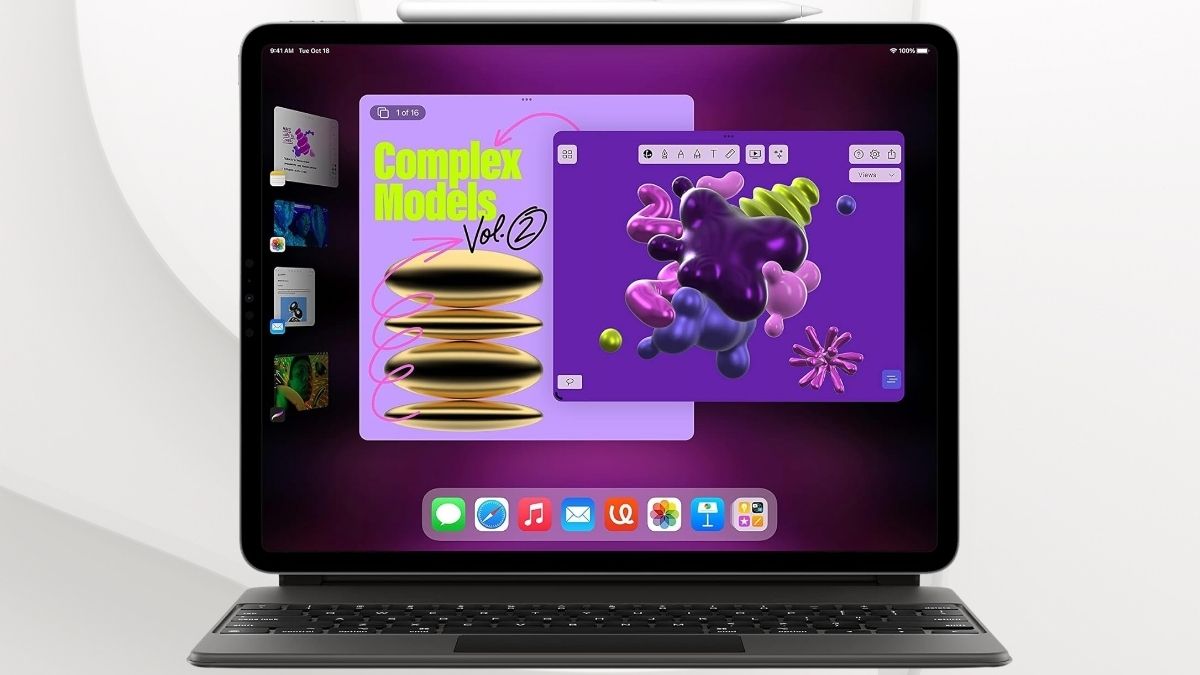
- Magic Keyboard – Turns the iPad into a near-laptop with a trackpad and backlit keys.
- Smart Keyboard Folio – A lighter option if you just need typing functionality.
iPadOS Features to Know:
- Stage Manager – Enables windowed multitasking, more like a desktop.
- Universal Control & Sidecar – Seamlessly integrate with your Mac setup.
- Quick Note, Scribble, and app enhancements – Make this more than just a touchscreen experience.
Price and Value: Renewed for Smart Shoppers
With flagship tablets often costing well over $1,000, the renewed 2022 iPad Pro is a compelling value. It delivers nearly all the same features and performance as a brand-new unit, but at a significantly reduced price. Plus, Amazon’s Renewed guarantee offers extra peace of mind.
Why the renewed model makes sense:
- Inspected, tested, and certified by Amazon Renewed
- Backed by a 90-day guarantee
- Significant savings without performance compromise
Final Verdict: Renewed, Refined, and Ready for Work
The 2022 Apple iPad Pro (renewed) is a solid choice for people who need serious performance in a sleek, portable package. It’s ideal if you’re a creative professional, a student balancing school and side projects, or someone working on the go. You won’t feel like you’re using last year’s tech—in fact, it may outperform what’s in your laptop bag right now.
iPadOS still has a few limits if you’re trying to fully replace a laptop, especially in terms of file management or external display support. But for many, it’s more than capable. And paired with the right accessories, it becomes a productivity and creativity powerhouse—at a fraction of the original cost.




