

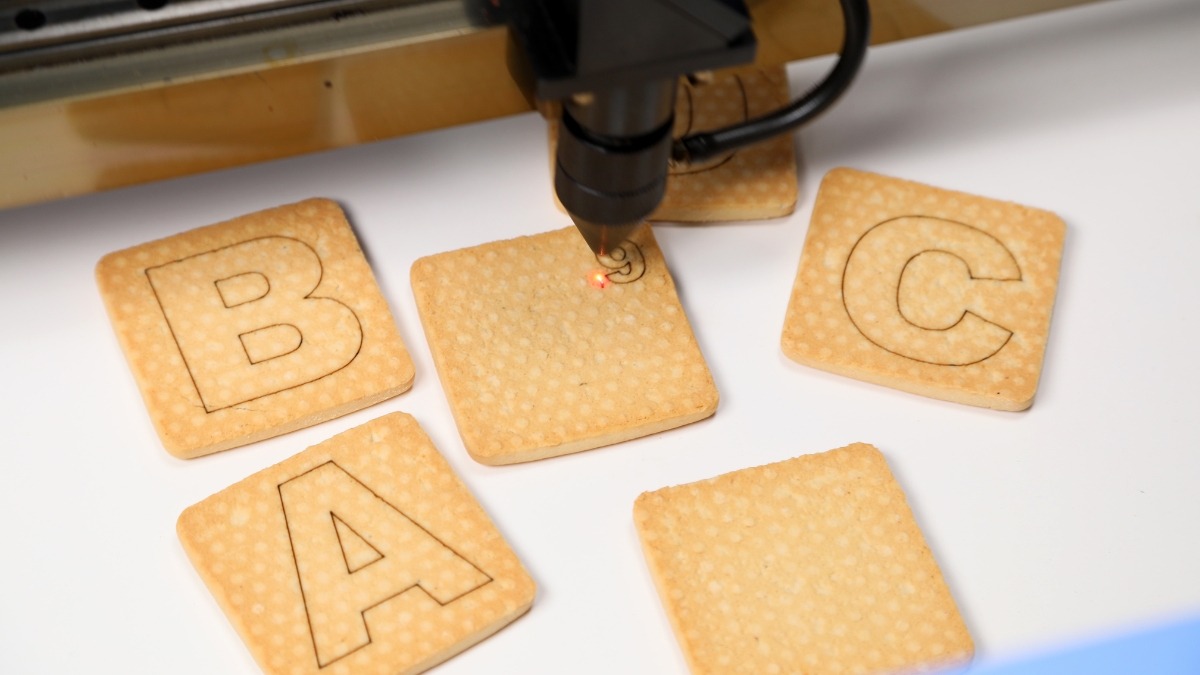
The Creality Falcon 2 22W grabs attention fast. It brings serious cutting power and surprising precision for the price. You get a 22W laser strength packed into a compact frame that works just as well for detailed projects as it does for bigger ones.
First launched in 2023, it’s still going strong in 2025. The Falcon 2 combines four 6W diodes with smart compression tech to sharpen the beam and boost accuracy. Whether you’re crafting signs, customizing gifts, or launching a small side hustle, this laser has real potential.
Let’s break down what makes this machine worth a look.
Creality Falcon 2 22W Gets the Job Done Fast
The first thing you’ll notice is the laser power. This thing means business. The Creality Falcon 2 22W uses FAC spot compression tech that sharpens the laser down to a tiny 0.1mm dot. That means more precise cuts and sharper detail.
It combines four 6W lasers to get 22W of total output. That power lets you cut wood up to 15mm thick in one pass. It also handles engraving on everything from leather and acrylic to plastic and brushed metal.
It’s not just powerful—it’s fast. With speeds up to 25,000mm per minute and 254 DPI resolution, your designs come out clean and crisp, even when you’re working on a deadline.
The Creality Falcon Laser Engraver Makes Work Easier
The working area is generous at 400mm by 415mm. That gives you room for signs, plaques, coasters, and more. You can handle big and small jobs on the same table.
What’s great is how easy it is to get started. Setup takes around 30 to 45 minutes. The frame is strong but light, with solid aluminum rails that keep everything stable. Even beginners can figure things out fast.
Cables are tucked neatly with sleeves and routing channels, so the whole machine looks clean and runs smooth. You won’t have to deal with mess or loose wires getting in your way.
Safety Features That Keep You in Control
Creality didn’t forget about safety. The Falcon 2 has flame and motion sensors. If something weird happens—like a sudden shake or fire risk—it stops right away.
There’s also a key switch to keep it off when not in use. The emergency stop button is easy to reach too. The built-in air assist system helps blow away dust and smoke while cutting, which helps keep the laser cool and your work surface clean.
For extra safety, you should wear laser-safe glasses and think about adding an enclosure if you’re using this at home or in a shared space.
Software That Works for Everyone
The Falcon 2 supports LaserGRBL and LightBurn. LaserGRBL is free and simple to use, perfect for beginners. LightBurn gives you more features like layering and power control—great for serious users who want full creative control.
There’s even an offline preview function. It shows your project path directly on the work surface before it starts cutting. That means fewer mistakes and less wasted material.
You can also upload G-code directly if you want full manual control of your cuts. That’s helpful for more advanced projects and fine-tuning.
What You Can Make with the Falcon 2
This laser machine handles a wide range of materials. You can cut and engrave wood, leather, rubber, acrylic, plastic, bamboo, fabric, and even stainless steel.
One of the coolest features is the colored engraving on metal. It uses heat to create shades on brushed steel without needing special paints. That opens the door to colorful designs and logos.
A small wooden sign takes about 10 minutes to engrave. Cutting a 3mm plywood piece the same size takes just 2-3 minutes. On metal, a full-color name tag takes around 4-5 minutes.
Creative businesses love this for customized products—keychains, business signs, custom tags, wedding pieces, and more.
Price and Options That Fit Different Budgets
Here’s the breakdown:
- Standard Falcon 2 22W: $769.00
- With Rotary Roller Kit: $999.99
- Falcon 2 Pro (with camera and enclosure): $1,329.00
All kits include the machine, laser module, essential tools, and a 12-month warranty. The higher-tier options give you better safety and easier alignment with live camera monitoring.
Compared to other 20-25W laser engravers, the Falcon 2 stays affordable. You save about 10 to 15 percent on average and still get powerful, pro-level results.
Why It’s a Solid Choice for 2025
We tested the Falcon 2 22W on wood, leather, metal, and more. It handled everything we threw at it. The cut quality was clean. The details were sharp. The speed helped us get things done quicker.
It’s a strong pick for small business owners, hobby makers, and creative users who want a reliable laser engraver without paying for an industrial setup. You also get support from a growing community and easy access to spare parts.
Looking to get started or upgrade? This machine gives you power, performance, and peace of mind without the headache.
Built for Creators Who Want More Without the Hefty Price
The Creality Falcon 2 22W checks a lot of boxes. It’s fast, sharp, safe, and versatile. You can tackle real projects without needing to babysit every step. It feels like a pro tool made for normal users.
If you’re serious about cutting or engraving, it’s one of the best options in its class. You can get it now on Amazon and start creating your next project right out of the box.




