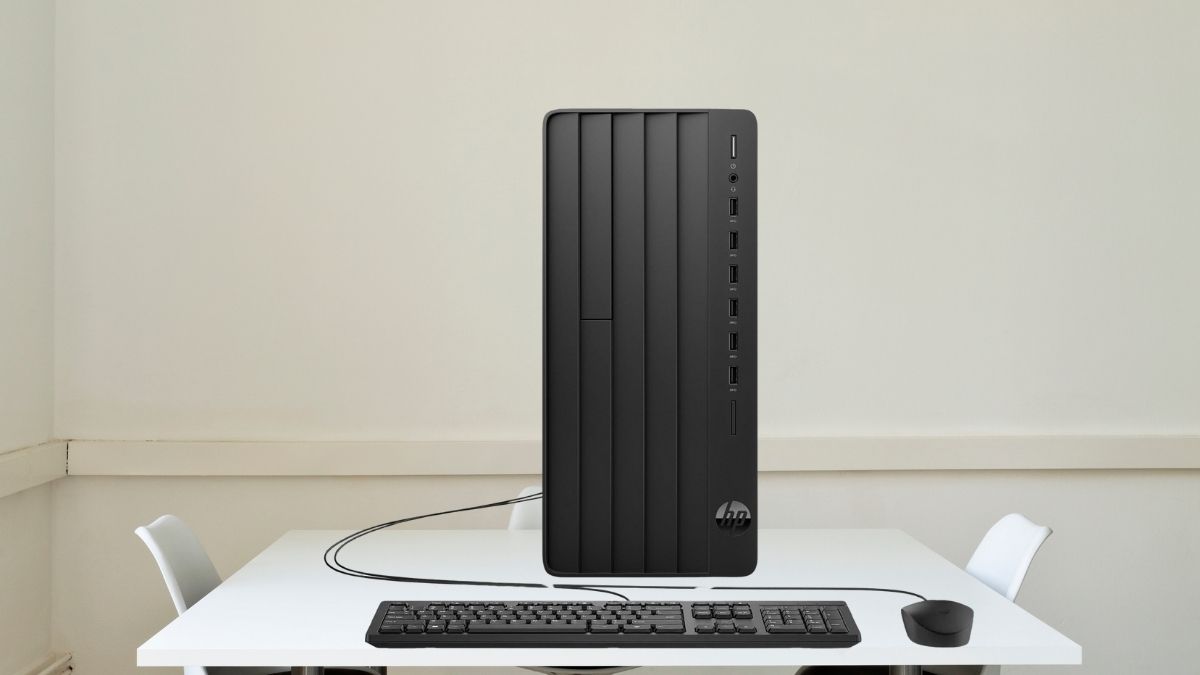
In today’s business landscape, reliability isn’t a luxury—it’s a requirement. The HP Pro Tower 290 G9 reflects this reality with a design that prioritizes consistent, everyday performance over flashy features or excess. It’s not trying to be everything to everyone. It’s built to do one job well: keep your business running efficiently.
What sets it apart immediately is the 32GB of RAM—twice the standard at this price point. That’s not overkill. It’s a response to how modern offices actually work: multiple apps running, large files transferring, real-time communication ongoing.
This machine is engineered for those scenarios and more. Let’s explore why the HP Pro Tower 290 G9 is a smart investment for small businesses, corporate offices, and remote teams alike in 2025.
Business-Class Performance That Keeps Up
At the center of this machine is the 13th Gen Intel Core i3-13100 processor—four cores, eight threads, and a 12MB cache working together to keep tasks moving without delay.
- Practical multitasking: Whether you’re hosting a video call, managing large spreadsheets, or toggling between browser tabs, performance remains smooth.
- Improved responsiveness: Compared to previous generations, this CPU brings a 15–20% boost in performance for office tasks. That translates to less waiting, more doing.
For most business users, the i3-13100 hits the ideal balance of capability and cost. It doesn’t overspend on power, but it doesn’t cut corners either.
Memory and Storage Built for the Way You Work
A desktop’s real speed often depends more on RAM and storage than the processor—and here’s where the 290 G9 impresses.
Generous 32GB RAM
- Dual-channel DDR4-3200 (2 x 16GB) means greater bandwidth and faster memory operations.
- Ideal for software like accounting platforms, ERP tools, and browser-heavy workflows.
- Prevents slowdowns when many applications are open at once—a common business scenario.
Fast 1TB NVMe SSD
- Sequential read/write speeds up to 3,500/2,500 MB/s mean boot-ups in under 15 seconds.
- Large file transfers complete in seconds, not minutes.
- Plenty of room for documents, software, and internal databases—with room to grow via extra drive bays.
Together, the memory and storage design enable a snappy, reliable experience all day long.
Connectivity That Matches Office Needs
The HP Pro Tower 290 G9 includes the right mix of modern and legacy ports for a broad range of business peripherals.
- Front panel: 4x USB 3.2 Gen 1 Type-A ports (up to 5Gbps) for fast file transfers and temporary connections.
- Rear panel: 4x USB 2.0 Type-A ports for devices like printers and keyboards.
- Display support: HDMI and VGA outputs allow for dual monitors—ideal for multitasking and data comparison.
Add in a Gigabit Ethernet port and an included USB Wi-Fi adapter, and you’re covered whether you need wired speed or wireless flexibility. There’s also a combo audio jack up front for easy headset setup—no fiddling with rear ports.
Thoughtful Design with Room to Grow
This is a tower built for the business environment—unobtrusive, expandable, and easy to maintain.
- Compact but accessible: At just over 13″ tall, it fits under most desks while allowing airflow and component access.
- Quiet operation: Even under load, it stays below 30dB—low enough not to disturb a meeting or concentration.
- Security and stability: A Kensington lock slot and firmware-level protections help keep data and hardware secure.
The included wired mouse and keyboard are basic but serviceable. Those planning extended use may want to opt for ergonomic replacements.
Built-In Expansion Options Extend Its Lifespan
HP didn’t just design this for today’s business—it built in options for tomorrow’s needs, too.
- PCIe 4.0 x16 slot: Install a dedicated GPU if your team moves into design, CAD, or video work.
- PCIe 3.0 x1 slot: Add extra USB ports, audio cards, or other peripherals.
- M.2 slots: Upgrade your wireless card or drop in another fast SSD.
The internal 3.5″ bay accommodates high-capacity HDDs, while the 9.5mm optical drive bay gives flexibility for businesses that still use physical media. All powered by a capable 180W PSU that keeps the system stable even with added components.
Windows 11 Pro: Tools for Secure and Scalable Management
Preinstalled with Windows 11 Pro, the 290 G9 offers enterprise features right out of the box:
- BitLocker encryption and Windows Information Protection safeguard sensitive data.
- Remote Desktop allows for off-site access and IT support.
- Group Policy and Windows Autopilot help standardize configuration across devices—key for growing teams or distributed offices.
- Tight Microsoft 365 integration ensures cloud collaboration, secure file syncing, and modern productivity tools.
This OS version is meant for business, and it’s a meaningful upgrade over Windows Home for companies that value security, control, and scale.
Built-In Graphics that Handle Most Office Visuals
The Intel UHD Graphics 730 handles day-to-day visual tasks without trouble:
- Supports up to 4K via HDMI, 1080p via VGA.
- Dual-monitor setups work seamlessly—ideal for workflows involving reports, dashboards, or design previews.
- Smooth performance in video calls, document rendering, and presentations.
If your work ever expands into heavier visual processing, the available PCIe slot means you can easily add a more capable GPU down the line.
Solid, Scalable, and Purpose-Built
The HP Pro Tower 290 G9 isn’t trying to impress with flashy specs. It earns its place in a business setting by being dependable, responsive, and flexible. You get strong baseline performance, room for upgrades, and enterprise-ready features—all in a form factor that stays out of the way.
For teams that need a desktop built for the long workweek—not just quick bursts of performance—it’s an option worth serious consideration. You’ll find it available on Amazon, often with customizable configurations to match your business needs.