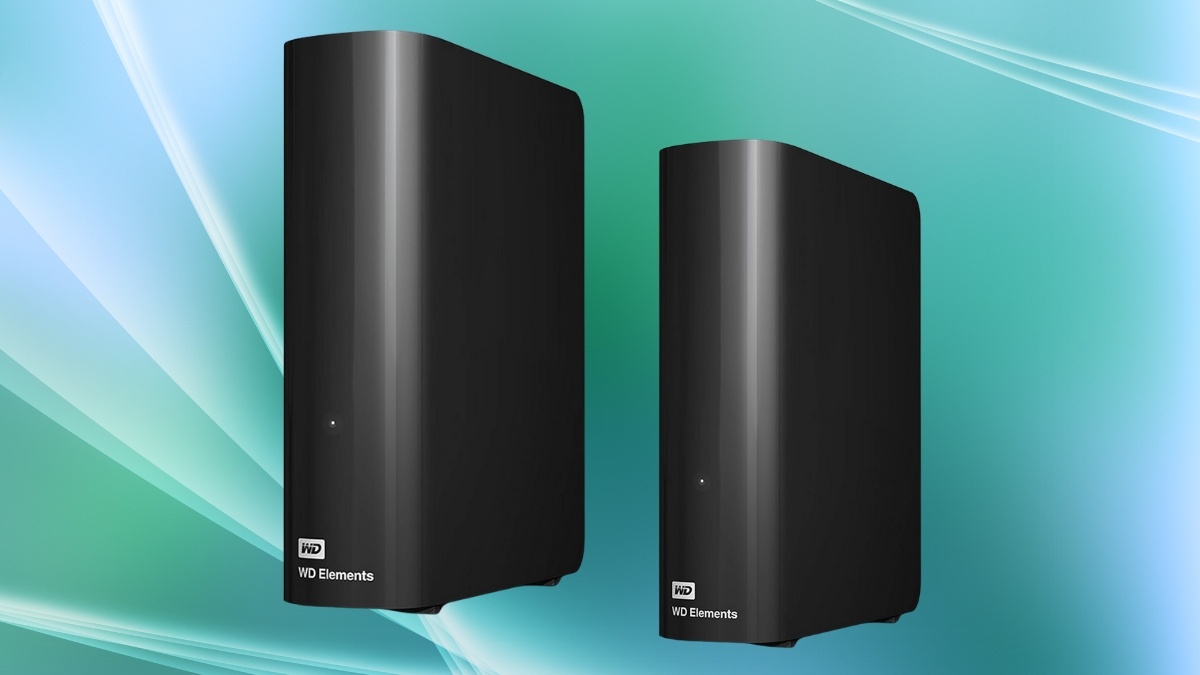
Running out of space for your videos, photos, and work files? You’re not alone. As digital content keeps growing in size, the need for a solid storage solution becomes a real concern. That’s where the Western Digital external hard drive comes in.
The 14TB Western Digital Elements desktop drive packs a punch. It’s designed for people who handle tons of media, manage large backups, or just want to avoid juggling multiple drives. With over 23,800 positive reviews, it’s clear this drive checks a lot of boxes. You get reliable space, decent speed, and real value in one simple package.
This drive can store thousands of large files without blinking. It’s compatible with both Windows and macOS (just a quick reformat for Mac users), and setup is as easy as plugging it in. No tech headaches. No complex steps. You plug it in and get to work.
Here’s why this one’s worth a closer look.
Western Digital External Hard Drive: A Powerhouse in a Small Box
The Western Digital Elements 14TB model is all about big capacity without the bulk. It measures just 5.31 by 1.89 by 6.53 inches and weighs under a pound. That’s compact enough for most desks and setups. The sleek black shell and vertical design help it blend into workspaces without being a visual distraction. It stays cool during long file transfers thanks to decent airflow and efficient build.
This is a USB hard drive with a USB 3.0 interface. That means fast data transfer and broad compatibility. It’s backward-compatible with USB 2.0, so it works even on older devices, though transfer speeds will be slower.
Now let’s talk numbers.
External Hard Disk That Can Handle a Digital Avalanche
This external hard disk holds up to 14 terabytes. That’s a lot of digital elbow room. You’re looking at space for around:
- 2.8 million photos
- 700 hours of 4K video
- 3.5 million songs
- Or years of archived work files
Need smaller or bigger options? No problem. Western Digital offers this model from 3TB up to 24TB. For the 14TB version, you’re paying around $263.91. That’s roughly $18.85 per terabyte. And yes, that’s a solid deal.
Here’s how the cost-per-TB compares across different capacities:
| Capacity | Price | Cost per TB |
| 3TB | $179.99 | $60.00 |
| 6TB | $159.99 | $26.67 |
| 8TB | $169.99 | $21.25 |
| 10TB | $219.99 | $22.00 |
| 12TB | $256.00 | $21.33 |
| 14TB | $278.99 | $18.85 |
| 16TB | $248.54 | $15.53 |
| 18TB | $309.99 | $17.22 |
| 20TB | $301.50 | $15.08 |
| 22TB | $409.99 | $18.64 |
| 24TB | $546.99 | $22.79 |
You’re getting a ton of storage without draining your wallet. And for shoppers on Amazon, free shipping sweetens the deal.
Portable HDD Performance Without the Fuss
This drive isn’t an SSD, so don’t expect lightning speed. But it still holds its own.
Here’s how it performs in real life:
- Large files like 4K videos transfer at about 130 to 150 MB/s
- Mixed files like photos and docs range between 80 to 120 MB/s
- Tiny files like databases or logs transfer at 50 to 70 MB/s
That’s enough for backups, media libraries, and project archives. It connects using a USB Micro-B to USB-A cable, which comes in the box. Just plug in the power adapter, connect it to your PC or Mac, and you’re good to go.
For Mac users, reformatting takes a few clicks through Disk Utility. After that, it works smoothly.
What You Can Actually Do With This Drive
This isn’t just a storage box. People use it in lots of ways:
Content creators
Store raw footage, edited projects, or photo libraries. Free up your SSD for current tasks.
Media collectors
Keep hundreds of 4K movies, entire music libraries, or years of family videos in one place.
Tech users and IT folks
Back up important files, entire systems, or use it in 3-2-1 backup plans.
Sample backup setup:
- Keep your main files on your computer
- Save a copy to this 14TB external drive
- Save another copy to a cloud service
It’s a practical option for anyone serious about keeping data safe.
What People Say (Spoiler: They Like It)
With over 23,800 reviews and an average score of 4.5 stars, feedback speaks volumes. Here’s what stands out:
Good stuff
- Very dependable over years of use
- Setup is easy for everyone
- Quiet operation
- Great price for the size
Not-so-good stuff
- Not as fast as SSDs
- Needs power from a wall outlet
- Can run warm during long transfers
Users with realistic expectations are mostly satisfied. Those looking for ultra-speed for daily editing might want an SSD instead. But for storage, this drive delivers.
Should You Buy the WD Elements 14TB?
If you need extra room for your growing files, the Western Digital external hard drive is a smart buy. It’s affordable for its size, easy to use, and works with most setups. Transfer speeds are solid for a mechanical drive. Build quality holds up. Setup is simple.
It’s not flashy. It just works. And it works well.
Need a place to dump hundreds of gigabytes of content? Want a safe spot for your backups? This one checks both boxes.
Pick it up on Amazon and skip the stress of limited space.